

What’s new in Palmtech’s report writer?
You can now import categories from any active template directly into your current report and use a wider range of formatting tools in the cover page editor. Getting your inspection documentation done fast is crucial. That’s why we’ve rolled out these new capabilities designed to cut down on repetitive typing and give documents a visual upgrade.
How do you pull in categories from other Palmtech templates?
Just select a category from any active template and drop it right into the current report. Building the same section twice is a waste of time. If you’re writing a home inspection report but realize you need a category that only lives in your commercial template, you can pull it over directly. This makes it a breeze to slim down massive templates and lean on the library you’ve already created, so you can finish your report writing faster.

What cover page design tools did we add?
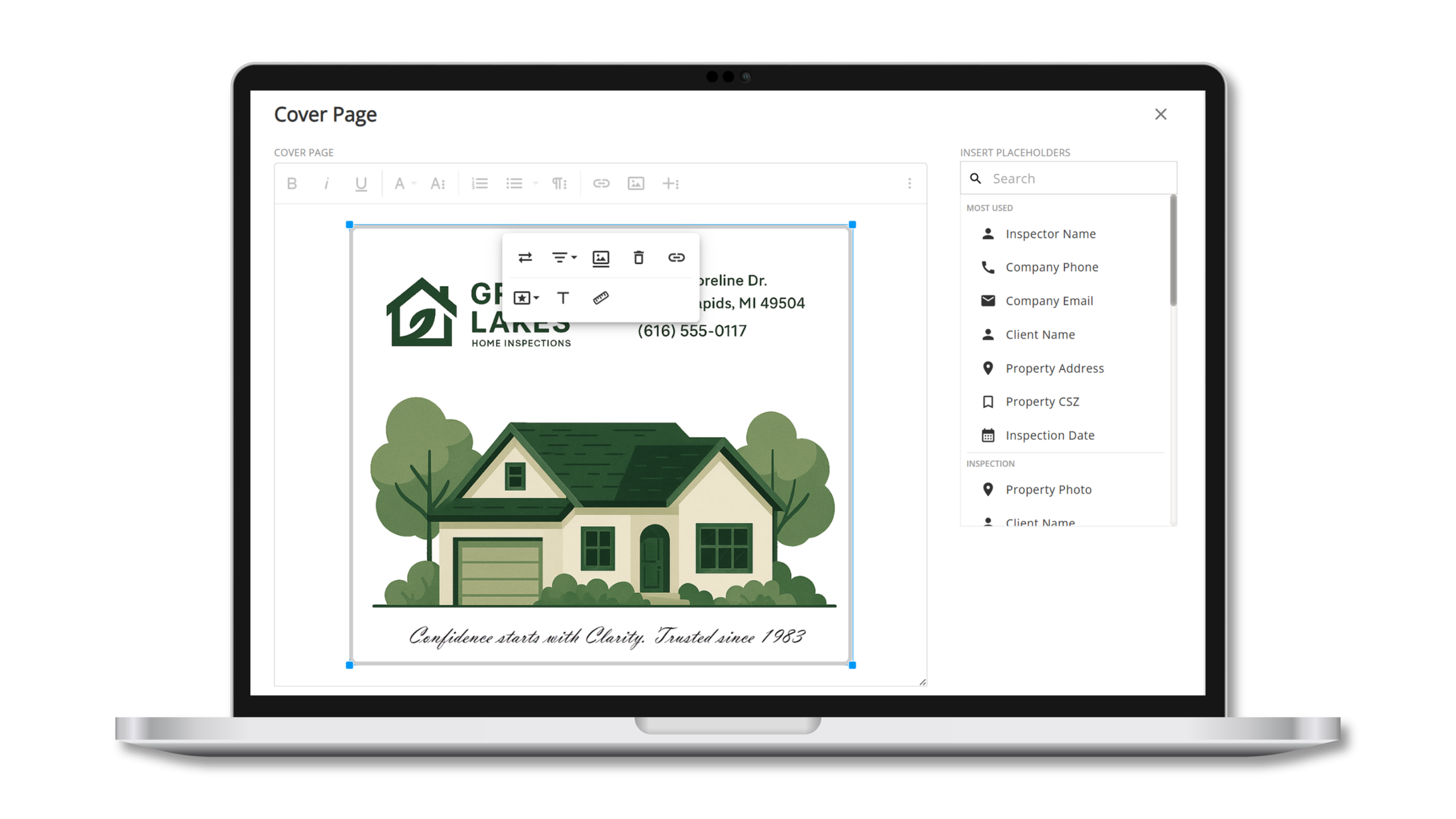
Palmtech’s cover page editor now works like a top-tier word processor, loaded with fresh image and table features. We’ve dropped the old limitations so you can customize your layout without having to find workarounds.
New formatting capabilities include:
- Add, merge, and split table cells
- Manage rows and columns
- Add alternative text to images
- Resize, replace, and align your pictures perfectly
Ready to ditch the busywork?
Experience these new features firsthand and see how much time you can save on your next inspection. Start your free trial of Palmtech today. Already a Palmtech user? Log in and give these new features a whirl!